
The Power of React Hooks

Create an app using only this new feature from React. We will build a new app called Slotify that inserts styled quotes throughout your blog posts.
React Hooks are a new addition to the React library, and have taken React developers by storm. Hooks allow you to write state logic and use other React features without having to write a class component. You can make your own apps using Hooks alone, a seismic shift for anyone on Team React.
In this article, we'll be building an app which I'll call "Slotify," using just React Hooks.
What Does Slotify Do and How Does It Do It?
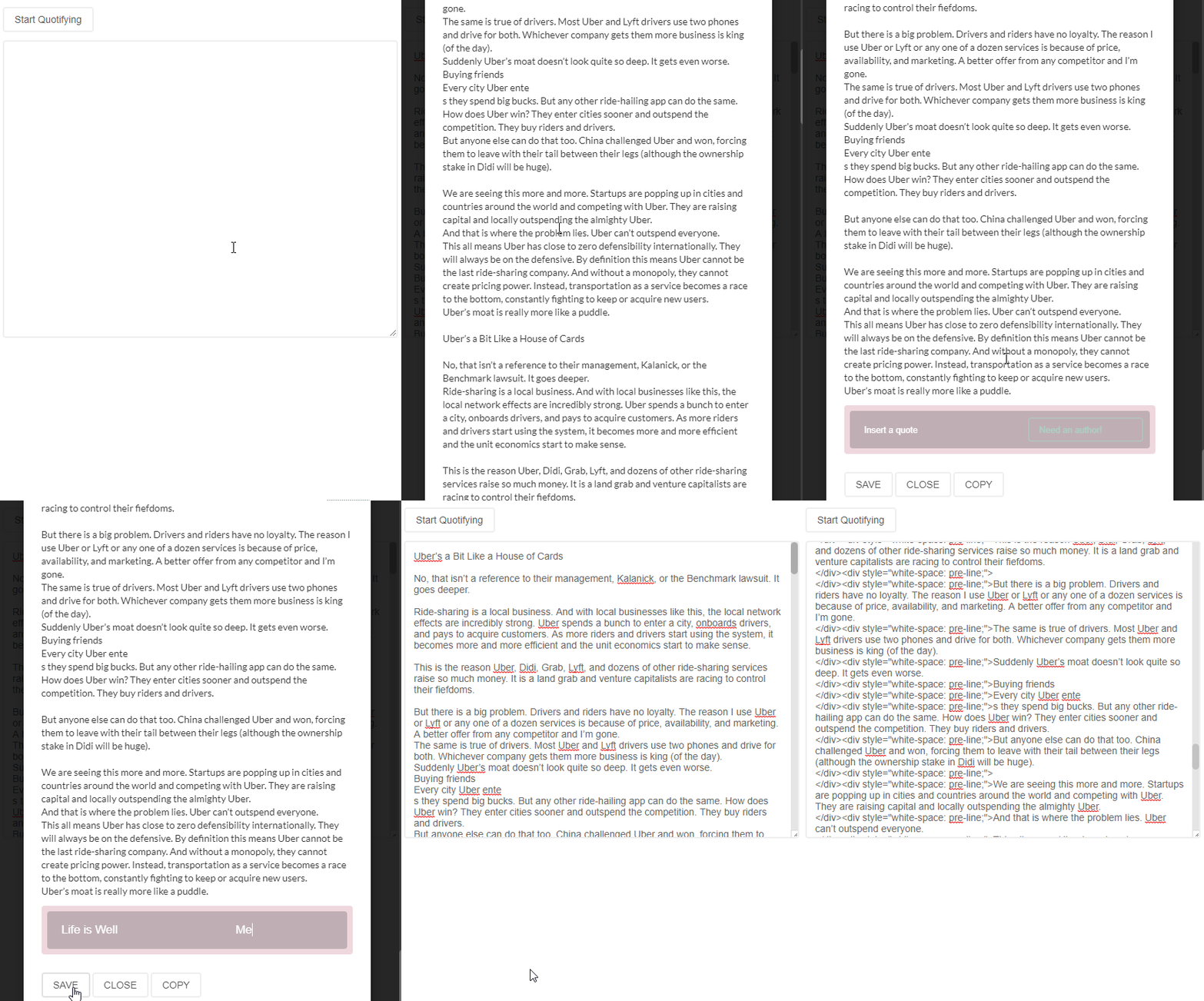
Slotify will provide a user interface that presents a textarea to insert quotes into any blog post. Newlines (\n) and word count will play a role in the quantity. A "Slotified" post will have a minimum of one and a max of three quotes. A quote can be inserted wherever a slot is available. The user will be able to interact with the slot and type or paste in a quote and author attribution of their choice. When they're done, they can click the save button and the blog post will reload, now including their quotes.
These are the hook apis we will be using: (Basically all of them)
- React.useState
- React.useEffect
- React.useRef
- React.useReducer
- React.useCallback
- React.useMemo
- React.useImperativeHandle
- React.useLayoutEffect
useSlotify(custom)
This is what we'll be building: (Converts a blog post into a blog post with styled quotes, and returns back an HTML source code of the post that includes the styles)
Let's get started
In this tutorial we are going to quickly generate a react project with create-react-app.
(If you want to get a copy of the repository from github, click here).
Go ahead and create a project using the command below. For this tutorial i’ll call our project build-with-hooks.
npx create-react-app build-with-hooksNow go into the directory once it's done:
cd build-with-hooksInside the main entry src/index.js we're going to clean it up a bit so we can focus on the App component:
src/index.js
import React from 'react'
import ReactDOM from 'react-dom'
import App from './App'
import './index.css'
import * as serviceWorker from './serviceWorker'
ReactDOM.render(<App />, document.getElementById('root'))
serviceWorker.unregister()
Now go to src/App.js and lets start with rendering nothing:
import React from 'react'

function App() {
  return null
}

export default App
The core functionality of our app is to allow a user to insert/write a blog post into some type of field so that quotes can be inserted.
To make sure that we stay positive and optimistic that we can do this, let's just tackle down the core functionality first so that we know we're in good shape.
That means we're going to first make a button so that the user has the ability to start by clicking it. Then, we're also going to create the textarea element so that the user can insert content into.
src/Button.js
import React from 'react'

function Button({ children, ...props }) {
  return (
    <button type="button" {...props}>
      {children}
    </button>
  )
}

export default Button
Inside index.css I applied some styling so that every button will have the same styles:
src/index.css
button {
  border: 2px solid #eee;
  border-radius: 4px;
  padding: 8px 15px;
  background: none;
  color: #555;
  cursor: pointer;
  outline: none;
}

button:hover {
  border: 2px solid rgb(224, 224, 224);
}
button:active {
  border: 2px solid #aaa;
}
Lets proceed to create the textarea component. We'll call it PasteBin:
src/PasteBin.js
import React from 'react'

function PasteBin(props) {
  return (
    <textarea
      style={{
        width: '100%',
        margin: '12px 0',
        outline: 'none',
        padding: 12,
        border: '2px solid #eee',
        color: '#666',
        borderRadius: 4,
      }}
      rows={25}
      {...props}
    />
  )
}

export default PasteBin
We're using inline styles because we want the styles to be included when the final content is generated. If we use pure CSS, only class name strings will be generated, so the components would turn out styleless.
We're going to create a react context to wrap this whole thing from the top so that we force all child components to stay in sync with the rest of the components. We'll do this by using React.useContext
Create a Context.js file:
src/Context.js
import React from 'react'

const Context = React.createContext()

export default Context
Now we are going to create Provider.js which will import Context.js and will hold all the logic in managing state:
src/Provider.js
import React from 'react'
import Slot from './Slot'
import { attachSlots, split } from './utils'
import Context from './Context'

const initialState = {
  slotifiedContent: [],
}

function reducer(state, action) {
  switch (action.type) {
    case 'set-slotified-content':
      return { ...state, slotifiedContent: action.content }
    default:
      return state
  }
}

function useSlotify() {
  const [state, dispatch] = React.useReducer(reducer, initialState)
  const textareaRef = React.useRef()

  function slotify() {
    let slotifiedContent, content
    if (textareaRef && textareaRef.current) {
      content = textareaRef.current.value
    }
    const slot = <Slot />
    if (content) {
      slotifiedContent = attachSlots(split(content), slot)
    }
    dispatch({ type: 'set-slotified-content', content: slotifiedContent })
  }

  return {
    ...state,
    slotify,
    textareaRef,
  }
}

function Provider({ children }) {
  return <Context.Provider value={useSlotify()}>{children}</Context.Provider>
}

export default Provider
This last code snippet is very important. We would have used React.useState to manage our state, but when you think about what our app is going to do, you might realize that it isn't just a single state. This is because there are situations from both sides that need to be taken into consideration:
- When does the user want to slotify their blog post?
- When should we show them the final, refurbished content?
- How many slots should we insert into the blog post?
- When should we show or hide the slots?
Knowing this, we ought to use a React.useReducer to design our state to encapsulate state update logic into a single location. Our first action is declared by adding the first switch case accessible by dispatching an action with type 'set-slotified-content'.
The way we are going to insert slots into the blog post is grabbing a string and converting it to an array delimiting it by newlines '\n' which is why the initial state declares slotifiedContent as an array, because that's where we will putting our working data in.
We also see a textareaRef declared as we need to use it to grab a reference to our PasteBin component we created earlier. We could have made the textarea completely controlled, but the easiest and most performant way to communicate with that is to just grab a reference to the root textarea element because all we need to do is grab its value instead of setting states. This will be grabbed from using the ref prop on textarea later.
Our slotify function is invoked when the user presses the Start Quotifying button to slotify their blog post. The intention is to pop up a modal and show them the slots that they can enter their quote/authors into. We use the reference to the PasteBin component to grab the current value of the textarea and migrate the content to the modal.
We then use two utility functions, attachSlots and split to slotify the blog post and use that to set state.slotifiedContent so that our UI can pick it up and do their job.
We put attachSlots and split into a utils.js file as follows:
src/utils.js
export function attachSlots(content, slot) {
  if (!Array.isArray(content)) {
    throw new Error('content is not an array')
  }
  let result = []
  // Post is too short. Only provide a quote at the top
  if (content.length <= 50) {
    result = [slot, ...content]
  }
  // Post is a little larger but 3 quotes is excessive. Insert a max of 2 quotes
  else if (content.length > 50 && content.length < 100) {
    result = [slot, ...content, slot]
  }
  // Post should be large enough to look beautiful with 3 quotes inserted (top/mid/bottom)
  else if (content.length > 100) {
    const midpoint = Math.floor(content.length / 2)
    result = [
      slot,
      ...content.slice(0, midpoint),
      slot,
      ...content.slice(midpoint),
      slot,
    ]
  }
  return result
}

// Returns the content back as an array using a delimiter
export function split(content, delimiter = '\n') {
  return content.split(delimiter)
}
To apply the textareaRef to the PasteBin, we have to use React.useContext to get the React.useRef hook we declared earlier in useSlotify:
src/PasteBin.js
import React from 'react'
import Context from './Context'

function PasteBin(props) {
  const { textareaRef } = React.useContext(Context)
  return (
    <textarea
      ref={textareaRef}
      style={{
        width: '100%',
        margin: '12px 0',
        outline: 'none',
        padding: 12,
        border: '2px solid #eee',
        color: '#666',
        borderRadius: 4,
      }}
      rows={25}
      {...props}
    />
  )
}

export default PasteBin
The last thing we are missing is creating the <Slot /> component because we used it inside our context. This slot component is the component that takes in a quote and author from the user. This won't be visible to the user right away because we are going to put it inside the modal component which will open only when the user clicks the Start Quotifying button.
This slot component will be a little tough, but i'll explain what's happening afterwards:
import React from 'react'
import PropTypes from 'prop-types'
import cx from 'classnames'
import Context from './Context'
import styles from './styles.module.css'

function SlotDrafting({ quote, author, onChange }) {
  const inputStyle = {
    border: 0,
    borderRadius: 4,
    background: 'none',
    fontSize: '1.2rem',
    color: '#fff',
    padding: '6px 15px',
    width: '100%',
    height: '100%',
    outline: 'none',
    marginRight: 4,
  }

  return (
    <div
      style={{
        display: 'flex',
        justifyContent: 'space-around',
        alignItems: 'center',
      }}
    >
      <input
        name="quote"
        type="text"
        placeholder="Insert a quote"
        style={{ flexGrow: 1, flexBasis: '70%' }}
        onChange={onChange}
        value={quote}
        className={styles.slotQuoteInput}
        style={{ ...inputStyle, flexGrow: 1, flexBasis: '60%' }}
      />
      <input
        name="author"
        type="text"
        placeholder="Author"
        style={{ flexBasis: '30%' }}
        onChange={onChange}
        value={author}
        className={styles.slotQuoteInput}
        style={{ ...inputStyle, flexBasis: '40%' }}
      />
    </div>
  )
}

function SlotStatic({ quote, author }) {
  return (
    <div style={{ padding: '12px 0' }}>
      <h2 style={{ fontWeight: 700, color: '#2bc7c7' }}>{quote}</h2>
      <p
        style={{
          marginLeft: 50,
          fontStyle: 'italic',
          color: 'rgb(51, 52, 54)',
          opacity: 0.7,
          textAlign: 'right',
        }}
      >
        - {author}
      </p>
    </div>
  )
}

function Slot({ input = 'textfield' }) {
  const [quote, setQuote] = React.useState('')
  const [author, setAuthor] = React.useState('')
  const { drafting } = React.useContext(Context)

  function onChange(e) {
    if (e.target.name === 'quote') {
      setQuote(e.target.value)
    } else {
      setAuthor(e.target.value)
    }
  }

  let draftComponent, staticComponent

  if (drafting) {
    switch (input) {
      case 'textfield':
        draftComponent = (
          <SlotDrafting onChange={onChange} quote={quote} author={author} />
        )
        break
      default:
        break
    }
  } else {
    switch (input) {
      case 'textfield':
        staticComponent = <SlotStatic quote={quote} author={author} />
        break
      default:
        break
    }
  }

  return (
    <div
      style={{
        color: '#fff',
        borderRadius: 4,
        margin: '12px 0',
        outline: 'none',
        transition: 'all 0.2s ease-out',
        width: '100%',
        background: drafting
          ? 'rgba(175, 56, 90, 0.2)'
          : 'rgba(16, 46, 54, 0.02)',
        boxShadow: drafting
          ? undefined
          : '0 3px 15px 15px rgba(51, 51, 51, 0.03)',
        height: drafting ? 70 : '100%',
        minHeight: drafting ? 'auto' : 70,
        maxHeight: drafting ? 'auto' : 100,
        padding: drafting ? 8 : 0,
      }}
    >
      <div
        className={styles.slotInnerRoot}
        style={{
          transition: 'all 0.2s ease-out',
          cursor: 'pointer',
          width: '100%',
          height: '100%',
          padding: '0 6px',
          borderRadius: 4,
          display: 'flex',
          alignItems: 'center',
          textTransform: 'uppercase',
          justifyContent: drafting ? 'center' : 'space-around',
          background: drafting
            ? 'rgba(100, 100, 100, 0.35)'
            : 'rgba(100, 100, 100, 0.05)',
        }}
      >
        {drafting ? draftComponent : staticComponent}
      </div>
    </div>
  )
}

Slot.defaultProps = {
  slot: true,
}

Slot.propTypes = {
  input: PropTypes.oneOf(['textfield']),
}

export default Slot
The most important part in this file is state.drafting. We didn't declare this in the context yet, but its purpose is to give us a way to know when to show the user the slots as well as when to show them the final output. When state.drafting is true (which is going to be the default value), we will show them the slots which are the blocks that they can insert their quote and quote's author to. When they click on the Save button, state.drafting will switch to false and we will use that to determine that they want to look at their final output.
We declared an input parameter with a default value of 'textfield' because in the future we might want to use other input types to let users insert quotes to besides typing (example: file inputs where we can let them upload images as quotes, etc). For this tutorial we're only going to support 'textfield'.
So when state.drafting is true, <SlotDrafting /> is used by Slot, and when it's false, <SlotStatic /> is used. It's better to separate this distinction into separate components so we don't bloat components with a bunch of if/else conditionals.
Also, although we declared some inline styles for the quote/author input fields, we still applied className={styles.slotQuoteInput} so that we can style the placeholder since we won't be able to do that with inline styles. (This is okay for the final refurbished content because inputs won't even be generated)
Here is the css for that:
src/styles.module.css
.slotQuoteInput::placeholder {
  color: #fff;
  font-size: 0.9rem;
}
Let's go back and declare the drafting state to the context:
src/Provider.js
import React from 'react'
import Slot from './Slot'
import { attachSlots, split } from './utils'
import Context from './Context'

const initialState = {
  slotifiedContent: [],
  drafting: true,
}

function reducer(state, action) {
  switch (action.type) {
    case 'set-slotified-content':
      return { ...state, slotifiedContent: action.content }
    case 'set-drafting':
      return { ...state, drafting: action.drafting }
    default:
      return state
  }
}

function useSlotify() {
  const [state, dispatch] = React.useReducer(reducer, initialState)
  const textareaRef = React.useRef()

  function onSave() {
    if (state.drafting) {
      setDrafting(false)
    }
  }

  function setDrafting(drafting) {
    if (drafting === undefined) return
    dispatch({ type: 'set-drafting', drafting })
  }

  function slotify() {
    let slotifiedContent, content
    if (textareaRef && textareaRef.current) {
      content = textareaRef.current.value
    }
    const slot = <Slot />
    if (content && typeof content === 'string') {
      slotifiedContent = attachSlots(split(content), slot)
    }
    dispatch({ type: 'set-slotified-content', content: slotifiedContent })
  }

  return {
    ...state,
    slotify,
    onSave,
    setDrafting,
    textareaRef,
  }
}

function Provider({ children }) {
  return <Context.Provider value={useSlotify()}>{children}</Context.Provider>
}

export default Provider
Now finally lets put this into the App.js component so we can see what this all looks like so far:
(Note: in this example I used a modal component from semantic-ui-react which is not required for the modal. You can use any modal or create a plain modal of your own using the react portal api):
src/App.js
import React from 'react'
import { Modal } from 'semantic-ui-react'
import Button from './Button'
import Context from './Context'
import Provider from './Provider'
import PasteBin from './PasteBin'
import styles from './styles.module.css'

// Purposely call each fn without args since we don't need them
const callFns = (...fns) => () => fns.forEach((fn) => fn && fn())

const App = () => {
  const {
    modalOpened,
    slotifiedContent = [],
    slotify,
    onSave,
    openModal,
    closeModal,
  } = React.useContext(Context)

  return (
    <div
      style={{
        padding: 12,
        boxSizing: 'border-box',
      }}
    >
      <Modal
        open={modalOpened}
        trigger={
          <Button type="button" onClick={callFns(slotify, openModal)}>
            Start Quotifying
          </Button>
        }
      >
        <Modal.Content
          style={{
            background: '#fff',
            padding: 12,
            color: '#333',
            width: '100%',
          }}
        >
          <div>
            <Modal.Description>
              {slotifiedContent.map((content) => (
                <div style={{ whiteSpace: 'pre-line' }}>{content}</div>
              ))}
            </Modal.Description>
          </div>
          <Modal.Actions>
            <Button type="button" onClick={onSave}>
              SAVE
            </Button>
          </Modal.Actions>
        </Modal.Content>
      </Modal>
      <PasteBin onSubmit={slotify} />
    </div>
  )
}

export default () => (
  <Provider>
    <App />
  </Provider>
)
Before we start up our server we need to declare the modal states (open/close):
src/Provider.js
import React from 'react'
import Slot from './Slot'
import { attachSlots, split } from './utils'
import Context from './Context'

const initialState = {
  slotifiedContent: [],
  drafting: true,
  modalOpened: false,
}

function reducer(state, action) {
  switch (action.type) {
    case 'set-slotified-content':
      return { ...state, slotifiedContent: action.content }
    case 'set-drafting':
      return { ...state, drafting: action.drafting }
    case 'open-modal':
      return { ...state, modalOpened: true }
    case 'close-modal':
      return { ...state, modalOpened: false }
    default:
      return state
  }
}

function useSlotify() {
  const [state, dispatch] = React.useReducer(reducer, initialState)
  const textareaRef = React.useRef()

  function onSave() {
    if (state.drafting) {
      setDrafting(false)
    }
  }

  function openModal() {
    dispatch({ type: 'open-modal' })
  }

  function closeModal() {
    dispatch({ type: 'close-modal' })
  }

  function setDrafting(drafting) {
    if (typeof drafting !== 'boolean') return
    dispatch({ type: 'set-drafting', drafting })
  }

  function slotify() {
    let slotifiedContent, content
    if (textareaRef && textareaRef.current) {
      content = textareaRef.current.value
    }
    const slot = <Slot />
    if (content && typeof content === 'string') {
      slotifiedContent = attachSlots(split(content), slot)
    }
    if (!state.drafting) {
      setDrafting(true)
    }
    dispatch({ type: 'set-slotified-content', content: slotifiedContent })
  }

  return {
    ...state,
    slotify,
    onSave,
    setDrafting,
    textareaRef,
    openModal,
    closeModal,
  }
}

function Provider({ children }) {
  return <Context.Provider value={useSlotify()}>{children}</Context.Provider>
}

export default Provider
And here's what we should have so far:
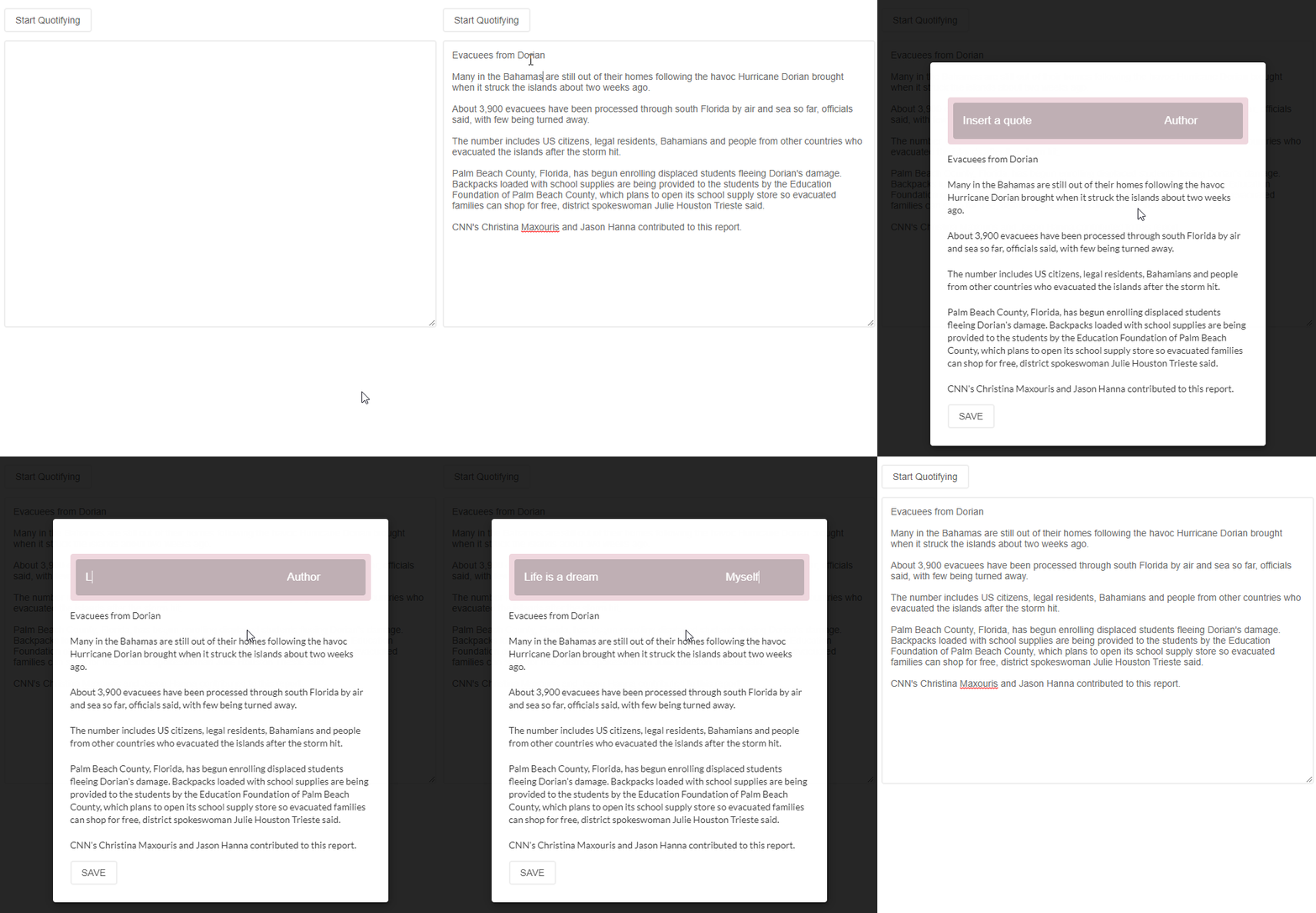
(Note: The SAVE button is closing the modal in the image, but that was a minor error. It should not close the modal)
Now we're going to change PasteBin a little to declare a new api using React.useImperativeHandle for the textarea so that we can use it in useSlotify and we don't bloat the hook with a bunch of functions but instead provide back an encapsulated api:
src/PasteBin.js
import React from 'react'
import Context from './Context'

function PasteBin(props) {
  const { textareaRef, textareaUtils } = React.useContext(Context)

  React.useImperativeHandle(textareaUtils, () => ({
    copy: () => {
      textareaRef.current.select()
      document.execCommand('copy')
      textareaRef.current.blur()
    },
    getText: () => {
      return textareaRef.current.value
    },
  }))

  return (
    <textarea
      ref={textareaRef}
      style={{
        width: '100%',
        margin: '12px 0',
        outline: 'none',
        padding: 12,
        border: '2px solid #eee',
        color: '#666',
        borderRadius: 4,
      }}
      rows={25}
      {...props}
    />
  )
}

export default PasteBin
textareaUtils will also be a React.useRef which will be placed right next to textareaRef in the useSlotify hook:
const [state, dispatch] = React.useReducer(reducer, initialState)
const textareaRef = React.useRef()
const textareaUtils = React.useRef()
We will use this new api in the slotify function:
src/Provider.js
function slotify() {
  let slotifiedContent, content
  if (textareaRef && textareaRef.current) {
    textareaUtils.current.copy()
    textareaUtils.current.blur()
    content = textareaUtils.current.getText()
  }
  const slot = <Slot />
  if (content && typeof content === 'string') {
    slotifiedContent = attachSlots(split(content), slot)
  }
  if (!state.drafting) {
    setDrafting(true)
  }
  dispatch({ type: 'set-slotified-content', content: slotifiedContent })
}
Now the next thing we are going to do is that when the user is looking at the slots and we detect that they haven't inserted an author yet, we flash that element to bring more of their attention.
For this, we are going to use React.useLayoutEffect inside the SlotDrafting component because SlotDrafting contains the author input:
src/Slot.js
function SlotDrafting({ quote, author, onChange }) {
  const authorRef = React.createRef()

  React.useLayoutEffect(() => {
    const elem = authorRef.current
    if (!author) {
      elem.classList.add(styles.slotQuoteInputAttention)
    } else if (author) {
      elem.classList.remove(styles.slotQuoteInputAttention)
    }
  }, [author, authorRef])

  const inputStyle = {
    border: 0,
    borderRadius: 4,
    background: 'none',
    fontSize: '1.2rem',
    color: '#fff',
    padding: '6px 15px',
    width: '100%',
    height: '100%',
    outline: 'none',
    marginRight: 4,
  }

  return (
    <div
      style={{
        display: 'flex',
        justifyContent: 'space-around',
        alignItems: 'center',
      }}
    >
      <input
        name="quote"
        type="text"
        placeholder="Insert a quote"
        onChange={onChange}
        value={quote}
        className={styles.slotQuoteInput}
        style={{ ...inputStyle, flexGrow: 1, flexBasis: '60%' }}
      />
      <input
        ref={authorRef}
        name="author"
        type="text"
        placeholder="Author"
        onChange={onChange}
        value={author}
        className={styles.slotQuoteInput}
        style={{ ...inputStyle, flexBasis: '40%' }}
      />
    </div>
  )
}
We probably didn't need the use of useLayoutEffect here, but it's just for demonstration. It's known to be a good option for style updates. since the hook is invoked after the dom is mounted and has had its mutations updated. The reason it's good for styling reasons is because it's invoked before the next browser repaint whereas the useEffect hook is invoked afterwards--which can cause a sluggy flashy effect in the UI.
styles:
src/styles.module.css
.slotQuoteInputAttention {
  transition: all 1s ease-out;
  animation: emptyAuthor 3s infinite;
  border: 1px solid #91ffde;
}

.slotQuoteInputAttention::placeholder {
  color: #91ffde;
}

.slotQuoteInputAttention:hover,
.slotQuoteInputAttention:focus,
.slotQuoteInputAttention:active {
  transform: scale(1.1);
}

@keyframes emptyAuthor {
  0% {
    opacity: 1;
  }
  50% {
    opacity: 0;
  }
  100% {
    opacity: 1;
  }
}
On the bottom of the modal we put a SAVE button which will invoke onSave from useSlotify. When the user clicks this, the slots will convert to finalized slots (when drafting === false). We will also render a button nearby that will copy the source code in HTML to their clipboard so that they can paste the content on their blog post.
So far, here is what we have:
Everything will stay the same, except now we work with CSS class names. For the new css class names they are suffixed with Static to indicate that they are used when drafting === false. Here is a slight change to the Slot component to accomodate the CSS changes:
src/Slot.js
function Slot({ input = 'textfield' }) {
  const [quote, setQuote] = React.useState('')
  const [author, setAuthor] = React.useState('')
  const { drafting } = React.useContext(Context)

  function onChange(e) {
    if (e.target.name === 'quote') {
      setQuote(e.target.value)
    } else {
      setAuthor(e.target.value)
    }
  }

  let draftComponent, staticComponent

  if (drafting) {
    switch (input) {
      case 'textfield':
        draftComponent = (
          <SlotDrafting onChange={onChange} quote={quote} author={author} />
        )
        break
      default:
        break
    }
  } else {
    switch (input) {
      case 'textfield':
        staticComponent = <SlotStatic quote={quote} author={author} />
        break
      default:
        break
    }
  }

  return (
    <div
      style={{
        color: '#fff',
        borderRadius: 4,
        margin: '12px 0',
        outline: 'none',
        transition: 'all 0.2s ease-out',
        width: '100%',
        background: drafting
          ? 'rgba(175, 56, 90, 0.2)'
          : 'rgba(16, 46, 54, 0.02)',
        boxShadow: drafting
          ? undefined
          : '0 3px 15px 15px rgba(51, 51, 51, 0.03)',
        height: drafting ? 70 : '100%',
        minHeight: drafting ? 'auto' : 70,
        maxHeight: drafting ? 'auto' : 100,
        padding: drafting ? 8 : 0,
      }}
      className={cx({
        [styles.slotRoot]: drafting,
        [styles.slotRootStatic]: !drafting,
      })}
    >
      <div
        className={styles.slotInnerRoot}
        style={{
          transition: 'all 0.2s ease-out',
          cursor: 'pointer',
          width: '100%',
          height: '100%',
          padding: '0 6px',
          borderRadius: 4,
          display: 'flex',
          alignItems: 'center',
          textTransform: 'uppercase',
          justifyContent: drafting ? 'center' : 'space-around',
          background: drafting
            ? 'rgba(100, 100, 100, 0.35)'
            : 'rgba(100, 100, 100, 0.05)',
        }}
      >
        {drafting ? draftComponent : staticComponent}
      </div>
    </div>
  )
}
And here are the newly added CSS styles:
.slotRoot:hover {
  background: rgba(245, 49, 104, 0.3) !important;
}

.slotRootStatic:hover {
  background: rgba(100, 100, 100, 0.07) !important;
}

.slotInnerRoot:hover {
  filter: brightness(80%);
}
Here is what our app looks like now:
The last thing we need to do is add a Close button to close the modal, and a Copy button to copy the source code of their finalized blog post.
Adding the Close button is easy. Just add this button next to the Save button. The Copy button will be placed next to the Close button. These buttons will be given some onClick handlers:
src/App.js
<Modal.Actions>
<Button type="button" onClick={onSave}>
SAVE
</Button>
<Button type="button" onClick={closeModal}>
CLOSE
</Button>
<Button type="button" onClick={onCopyFinalDraft}>
COPY
</Button>
</Modal.Actions>We should be done when we implement the onCopyFinalContent function, but we're not yet. We're missing one last step. When we copy the finalized content, which part of the UI are we copying? We can't be copying the entire modal because we don't want the SAVE, CLOSE and COPY buttons in our blog posts or it would look awfully awkward. We have to make another React.useRef and use that to attach to a specific element that only includes the content we want.
This is why we *used inline styles and not entirely CSS classes because we want the styles to be included in the refurbished version.
Declare modalRef in useSlotify:
const textareaRef = React.useRef()
const textareaUtils = React.useRef()
const modalRef = React.useRef()
Attach it to the element that will only contain the content:
src/App.js
const App = () => {
const {
modalOpened,
slotifiedContent = [],
slotify,
onSave,
openModal,
closeModal,
modalRef,
onCopyFinalContent,
} = React.useContext(Context)
const ModalContent = React.useCallback(
({ innerRef, ...props }) => <div ref={innerRef} {...props} />,
[],
)
return (
<div
style={{
padding: 12,
boxSizing: 'border-box',
}}
>
<Modal
open={modalOpened}
trigger={
<Button type="button" onClick={callFns(slotify, openModal)}>
Start Quotifying
</Button>
}
style={{
background: '#fff',
padding: 12,
color: '#333',
width: '100%',
}}
>
<Modal.Content>
<Modal.Description as={ModalContent} innerRef={modalRef}>
{slotifiedContent.map((content) => (
<div style={{ whiteSpace: 'pre-line' }}>{content}</div>
))}
</Modal.Description>
<Modal.Actions>
<Button type="button" onClick={onSave}>
SAVE
</Button>
<Button type="button" onClick={closeModal}>
CLOSE
</Button>
<Button type="button" onClick={onCopyFinalContent}>
COPY
</Button>
</Modal.Actions>
</Modal.Content>
</Modal>
<PasteBin onSubmit={slotify} />
</div>
)
}Note: We wrapped ModalContent with a React.useCallback because we want the reference to stay the same. If we don't, then the component will be re-rendered and all of the quotes/author values will be reset since the onSave function updates the state. When the state updates, ModalContent will re-create itself and making a new fresh empty state which is what we don't want.
And finally, onCopyFinalDraft will be placed inside the useSlotify hook that will use the modalRef ref:
src/Provider.js
function onCopyFinalContent() {
  const html = modalRef.current.innerHTML
  const inputEl = document.createElement('textarea')
  document.body.appendChild(inputEl)
  inputEl.value = html
  inputEl.select()
  document.execCommand('copy')
  document.body.removeChild(inputEl)
}
And we are done!
Here is our app now:
Conclusion
And that concludes the end of this post! I hope you found it useful and look out for more in the future!